Learn How to Enroll in Notifications in FieldView Cab App
Overview
Brief summary and frequently asked questions about notifications in FieldView™ Cab app.
Available on: Apple iOS™
Email reports and text alerts give growers real-time awareness of planting and harvest issues, progress, and performance wherever they are by receiving notifications through the season.
It is now possible to enroll in notifications directly from the FieldView™ Cab app. To begin, tap on Settings from the home screen and then select Notifications from the menu on the left.
The page is divided into the two primary types of notifications, email reports and text alerts.
During planting, Email Reports display statistics like planter speed, planting population, acres planted, and other relevant information. During harvest, an Email Report will include statistics like average yield, average moisture, and acres harvested. Email Reports can be received either on a daily basis or following each field change. To enroll in an Email Report simply enter an email address and select whether the report should be sent daily or after each field change by tapping on the checkboxes to the right.
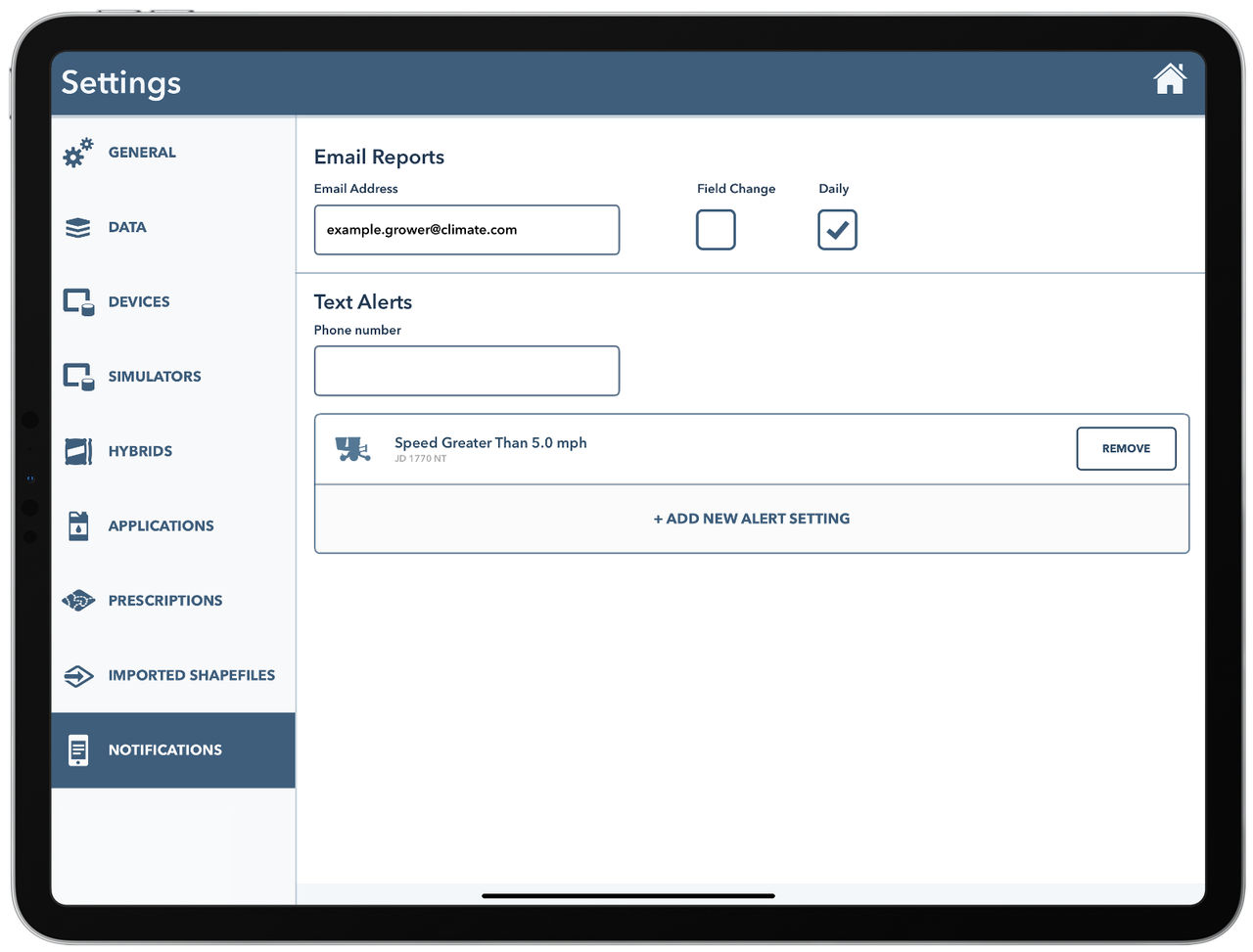
Text alerts work by sending a text message when a planter or combine exceeds a specified threshold while planting or harvesting. To begin, enter the phone number that should receive the text message and tap ‘+ Add Text Alert’. Next, select whether to enroll in a planting or harvest alert. If planting is selected, a specific planter within your operation will need to be identified. Then, select the metric that should be monitored and set the threshold that should be exceeded before sending a text message. The new alert will now be added to the list of active text alerts.
Text alerts can be deleted or added from the Notifications page at any time. A five-acre minimum exists to keep small anomalies from sending premature alerts. If data connectivity prevents the completion of a CloudSync, alerts on old data will not be sent.
Notifications FAQs
Is it possible to receive text alerts for multiple phone numbers?
Yes, it is possible to enter multiple phone numbers separated by commas.
Is it possible to receive email reports for multiple email addresses?
Yes, it is now possible to enter multiple email addresses separated by commas.
How long after the alert threshold is reached will I receive a text alert?
If the iPad® device that is connected to the equipment in the field has an internet connection, the text message should be sent in less than five minutes from the time the alert threshold is reached.
What metrics are included in the email report?
During planting email reports include the name of equipment being used, Field Name, Acres Planted, Avg Speed, Avg Population, Singulation, Good Spacing, Good Ride, and Down Force.
During harvest email reports include the name of equipment being used, Field Name, Acres Harvested, Avg Speed, Avg Yield, Avg Moisture, Total Bushels, and Total lbs.
What time of the day will I receive the daily email report?
10 PM CST
How do I stop receiving text alerts or email reports?
Visit the notifications page in Settings on any iPad® device logged into your account and remove the email address or phone number to discontinue receiving Notifications.
Where can I manage notification settings?
Notifications can be managed in the FieldView Cab app. Navigate to Settings, then select Notifications.