Contactate con nuestro equipo de soporte al 0800 666 2913 de lunes a viernes de 9 a 18hs y los fines de semana en horario reducido.
Snapshot Your Operation with the FieldView Dashboard
Overview
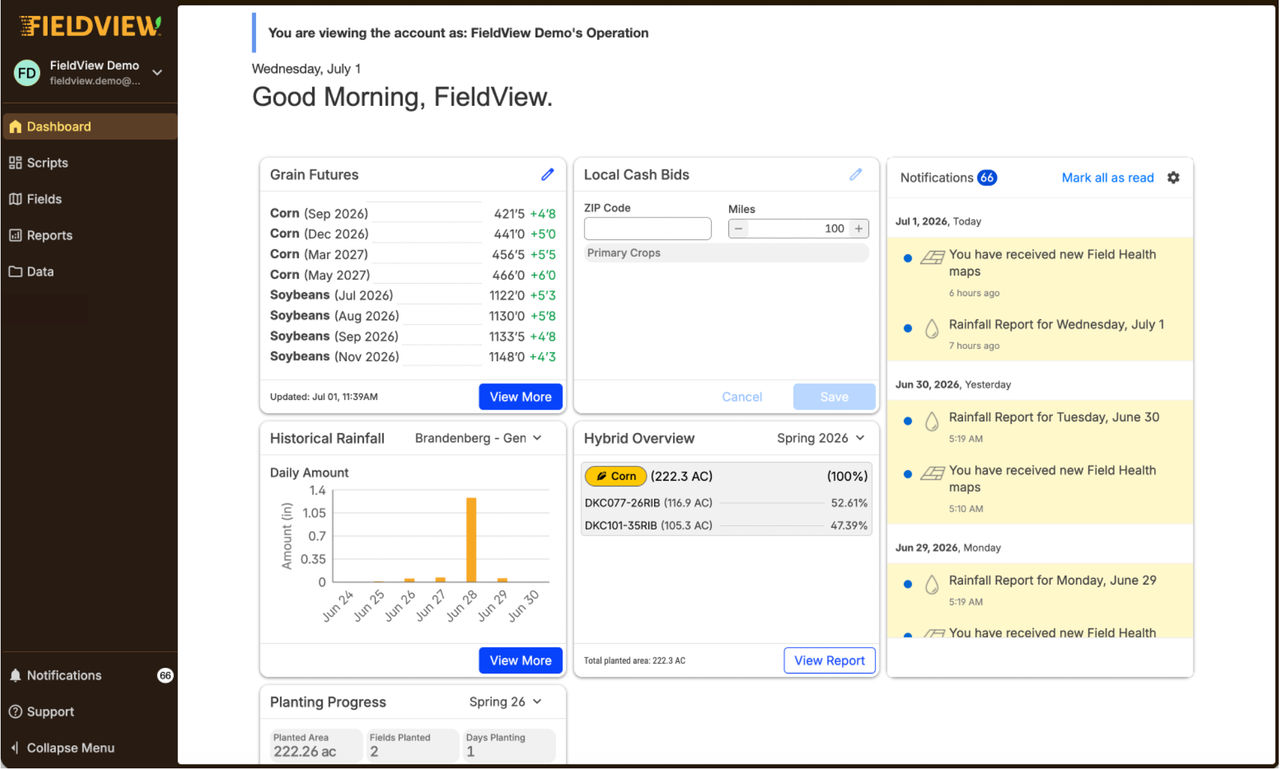
The FieldView Dashboard is a new homepage on FieldView.com that provides a snapshot of your operation using region-relevant widgets.
Available on: Web
View PDF Guide
What changed with this update?
- When you log in to FieldView.com, you will now land on the Dashboard instead of the Fields page. The Dashboard centralizes key information so you can quickly see what matters most without navigating across multiple platforms.
What information is available on the Dashboard?
- In the U.S., the Dashboard includes widgets such as:
Weather
Rainfall
Planting Progress
Harvest Progress
Notifications
Onboarding
Local Cash Bids
Grain Futures
How is this different from the previous experience?
Before:
- One-size-fits all landing page
- Required navigating multiple areas to gather insights
After:
- Centralized Dashboard view
- Key information available immediately at login
- Less time spent navigating, more time making decisions
Are these widgets new?
- Widgets have been available in the FieldView mobile app, but were not previously available on web. This update brings widgets to the web platform, creating a more consistent experience across devices.
How does the Dashboard help me?
The Dashboard helps you:
- Quickly understand current conditions and activity
- Monitor planting and harvest progress
- Stay informed with notifications and updates
- Access important insights without searching through multiple pages
Can I still access my Fields and other tools?
- Yes. All existing features, including your Fields, are still available. The Dashboard simply provides a new starting point to help you get there faster.
Why was this change made?
- Previously, users needed to navigate across multiple platforms to understand what was happening in their operation. The Dashboard addresses this by bringing key insights and workflows together in one place, helping you make faster, more informed decisions.
How does this improve collaboration?
- The Dashboard provides a shared view of key information, making it easier for Farmers, Advisors, and Support teams to align on the same data and insights when working together.
Will more features be added in the future?
- Yes. The Dashboard creates a foundation for additional widgets and region-specific updates in future releases.
The FieldView Dashboard is your new starting point in FieldView, bringing together the most important information about your operation into a single, streamlined view – so you can spend less time navigating and more time making decisions.
Estamos para ayudarte cuando lo necesites
Si tenés dudas, necesitás soporte o querés saber más sobre FieldView™, estamos a un mensaje, mail o llamado de distancia.