Shared Swath Harvesting with FieldView Drives & 20|20 YieldSense Monitors
What is Shared Swath?
During Harvest, shared swath exists on both Precision Planting 20|20 YieldSense® monitors and FieldView™ Drives. For shared swath to work, both combines must be using Drives and/or 20|20s. During Harvest operations, a Drive will swath to a Precision Planting 20|20 YieldSense® monitor. Shared swath allows two iPad® devices connected to 20|20s or Drives to share map tiles with each other and will signal each 20|20 or Drive to shut off rows (even with the head lowered) when passing over already harvested areas. You WILL NOT see the other combine(s) on the FieldView™ Cab app.
Shared Swath Requirements:
- Both iPad® devices have a good cellular connection (at least 5 mbps)
- Both iPad® devices must be signed into the same FieldView™ account (both have same username or email at the bottom of the home screen of FieldView™ Cab app)
- Both iPad® devices are on the same FieldView™ Cab app version
- Both iPad® devices have the same Field/Farm/Client and crop set to active
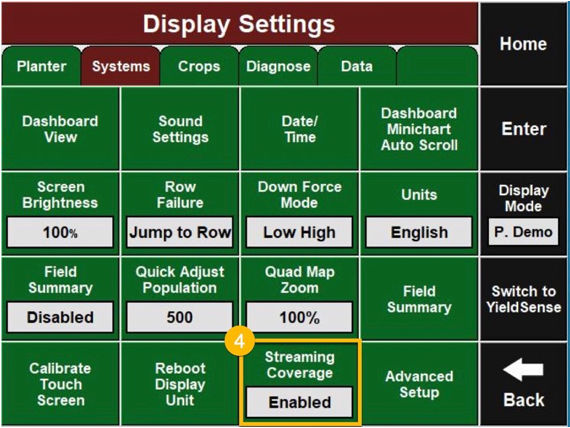
- For Precision Planting 20|20 YieldSense® monitors only, verify Coverage Streaming is Enabled
If you have met all the requirements and are still having issues, try hard rebooting on both iPad® devices.
Setting Up Shared Swath on Your Precision Planting 20|20 YieldSense® Monitor
20|20 YieldSense® Monitor Gen 1/2:
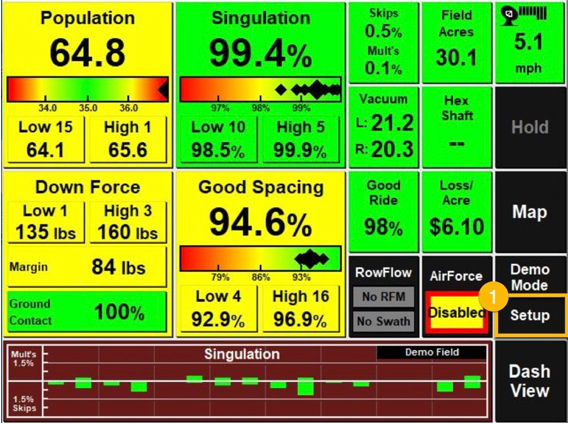
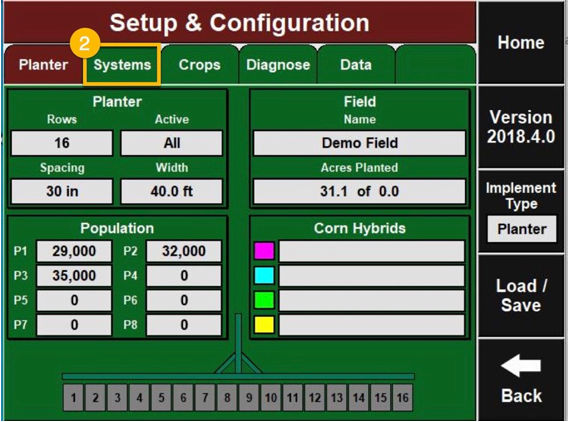
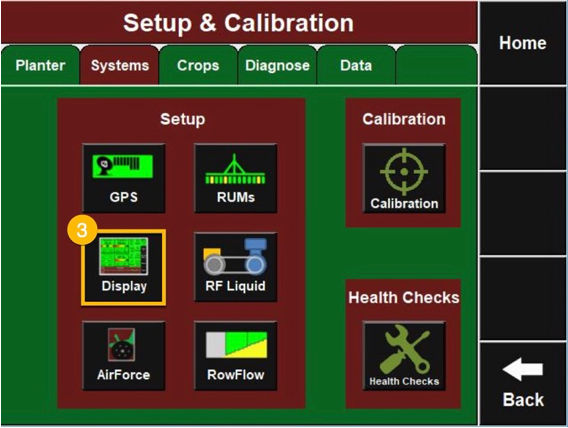
- Setup > Systems > Displays > Advanced Settings > Streaming Coverage Enabled
1. Setup
2. Systems
3. Display
4. Streaming Coverage
20|20 YieldSense® Monitor Gen 3:
- Setup > Diagnose > FVM > Shared Swath Enabled
1. Setup
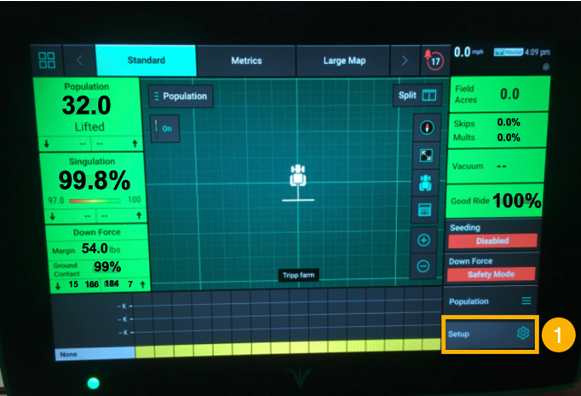
2. Diagnose
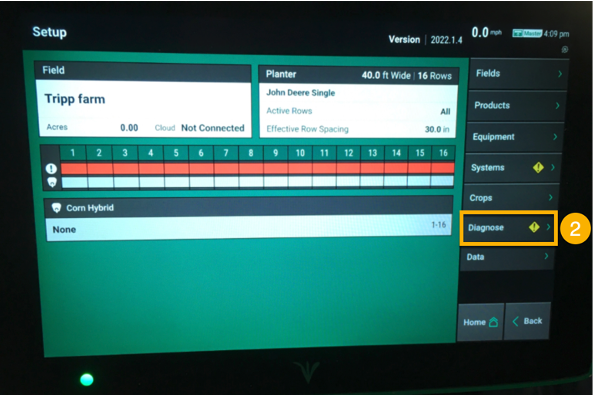
3. FVM
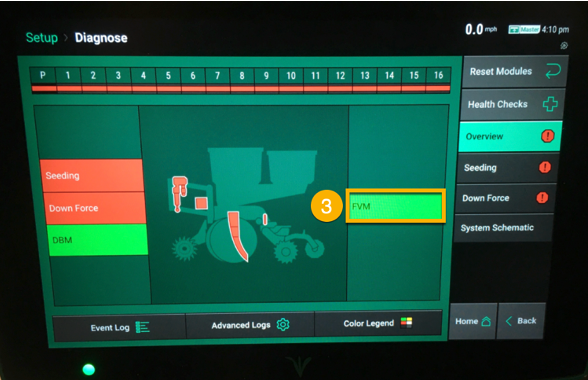
4. Shared Swath Enabled
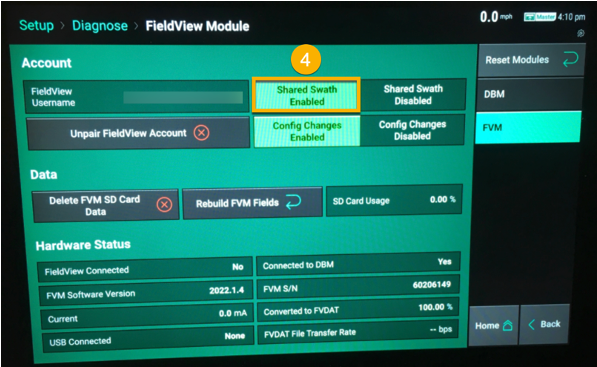
Important Information for Gen 3 Precision Planting 20|20 YieldSense® Monitors Using Shared Swath:
- The Gen 3 Precision Planting 20|20 YieldSense® monitors will NOT display the coverage map from a Generation 2 Precision Planting YieldSense® monitor. Shared swath will still work between the two monitors and the Gen 3 will swath off to the Gen 2’s coverage, but the coverage map on the Gen 3 will not update with the map from the Gen 2.
- If there is an issue: Unplug the iPad® device from the Precision Planting 20|20 YieldSense® monitor and then reconnect. Give the diagnostic 10 seconds to go back to green. If it does not go back to green, perform the disconnect/reconnect one more time and wait another 10 seconds.
- The Precision Planting 20|20 YieldSense® monitor only requests tiles from a 128’x128’ section at a time. It will not request tiles for the section that it is currently in more than once. So, if they have two combines right next to each other and combine A starts harvesting, combine B will not receive tiles until it moves into a different section.
- The Precision Planting 20|20 YieldSense® monitor also only requests tiles while it is harvesting, so you will not see coverage from another combine show up if you are just sitting still. You will need to look at the Precision Planting 20|20 YieldSense® monitor coverage map.
Please note that with the Precision Planting 20|20 YieldSense® coverage streaming, you will no longer see the gray map tiles appear on the FieldView™ Cab app. However, the FieldView™ Cab app will still quit mapping when passing over an area that has already been planted.
Shared Swath vs. Swath Control
Shared Swath
- Can NOT be visualized in FieldView™ Cab app. Shared swath is the data that is streamed (sent) by a shared swath server via internet (Cellular connection) which allows swath control to work. Shared swath is separate from CloudSync due to timing.
Swath Control
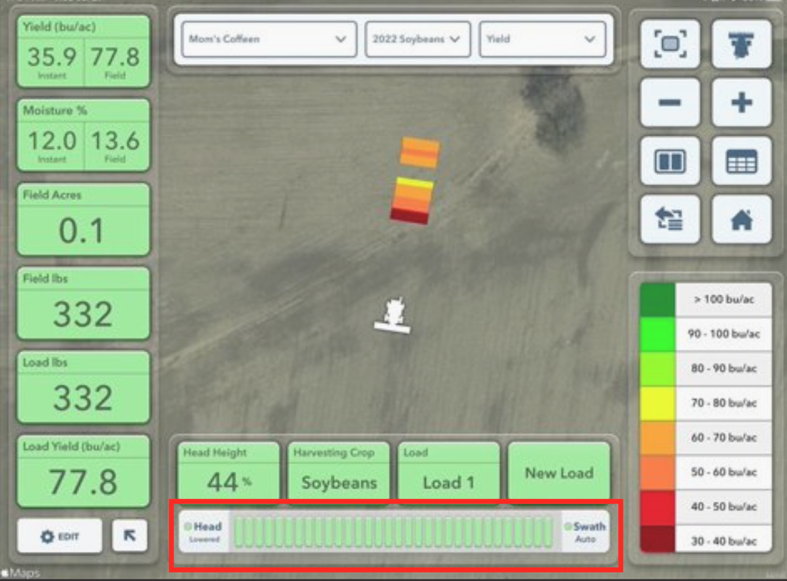
- Can be visualized in the metric pane as the user is harvesting by seeing the sections turn off (red) and on (green)
- Green will indicate they are harvesting/collecting data
- Red will indicate they are not harvesting/not collecting data
- Note: This can occur with the head raised or lowered
- This is used with or without shared swath
Shared Swath vs. CloudSync
- Shared swath creates a tile map in the background that allows for other combines to shut off in areas that have already been harvested.
- Shared swath has nothing to do with “Painting”. The painting aspect comes from CloudSyncing, therefore you cannot visualize shared swath (maps that show are CloudSynced down, so that is based off the iPad® device’s internet speed).
- To check and see if shared swath is working properly, cross over an area that has already been harvested. The swath bar at the bottom should turn red indicating shared swath is working properly.
- In previous years, users were able to “view” the shared swath tiles, but that feature was removed a few years ago for stability reasons.