Make Post-Harvest Yield Adjustments
Overview
Post harvest yield adjustment can be accomplished in FieldView at the whole field level and by combine for fields that have multiple combines in a single field.
Whole Field Adjustments in FieldView Cab App
Please note, these adjustments:
- Will be reflected everywhere that harvest data is displayed within Climate FieldView™ including Yield Analysis and the Field Region Report.
- Will not change the raw field data files and consequently will not be reflected when viewing harvest data in third party software programs.
- Are intended to be made after harvest is completed for each field. If any harvest data is collected on a field after an adjustment, the adjustment will be cleared and another adjustment will need to be made when the field is complete.
- Are whole field adjustments made by matching an absolute reference point of either acres, weight, or moisture for an entire field.
- Are not intended to be used for compensating for combine-to-combine variability.
NOTE: Farming operations with multiple combines operating in the same field should perform both whole field post harvest yield adjustments AND the multiple combine post harvest adjustment.
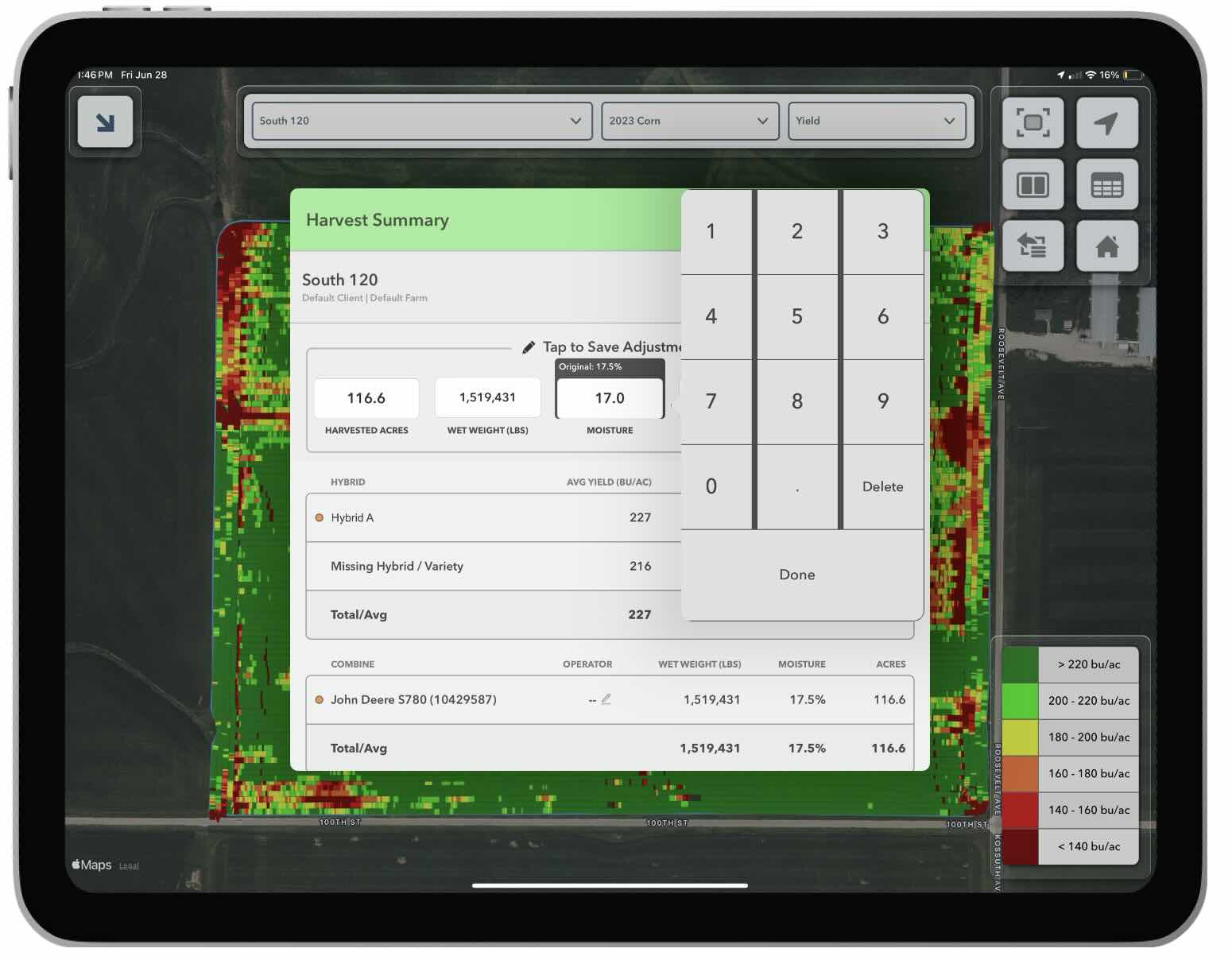
To adjust field yield in FieldView Cab app following harvest, open a yield map for any field, tap on the More Menu and then select the Harvest Summary.
The Harvest Summary report will appear showing Harvested Acres, Total Wet Weight, Field Moisture, Total Dry Bushels, and Average Yield that was measured in the selected field.
Tap anywhere on the row of summary values at the top. Values that can be edited include:
- Harvested Acres
- Total Wet Weight
- Dry Bushels
- Field Moisture
Edit any one or all of these values with the correct number. The original measured values are displayed above the edit fields to make it possible to undo corrections.
After yield has been adjusted as desired close the Harvest Summary report by tapping on the X.
Please note, these adjustments:
- Will be reflected everywhere that harvest data is displayed within Climate FieldView™ including Yield Analysis and the Field Region Report.
- Will not change the raw field data files and consequently will not be reflected when viewing harvest data in third party software programs.
- Are intended to be made after harvest is completed for each field. If any harvest data is collected on a field after an adjustment, the adjustment will be cleared and another adjustment will need to be made when the field is complete.
- Are whole field adjustments made by matching an absolute reference point of either acres, weight, or moisture for an entire field.
- Are not intended to be used for compensating for combine-to-combine variability.
NOTE: Farming operations with multiple combines operating in the same field should perform both whole field post harvest yield adjustments AND the multiple combine post harvest adjustment.
Whole Field Adjustments in iOS™ FieldView™ App
To adjust field yield in the FieldView app following harvest, follow these steps:
- Navigate to the Yield Analysis card on the Overview screen
- Select the field you want to make the yield adjustment for
- Select the three dots in the top right corner
- Select the three dots in the top right corner
- Choose the value that needs adjusted
- Enter the correct values and click Save
- Once all the values show the correct amount, click Apply
NOTE: Farming operations with multiple combines operating in the same field should perform both whole field post harvest yield adjustments AND the multiple combine post harvest adjustment.
Related Articles:
Multiple Combines in the Same Field